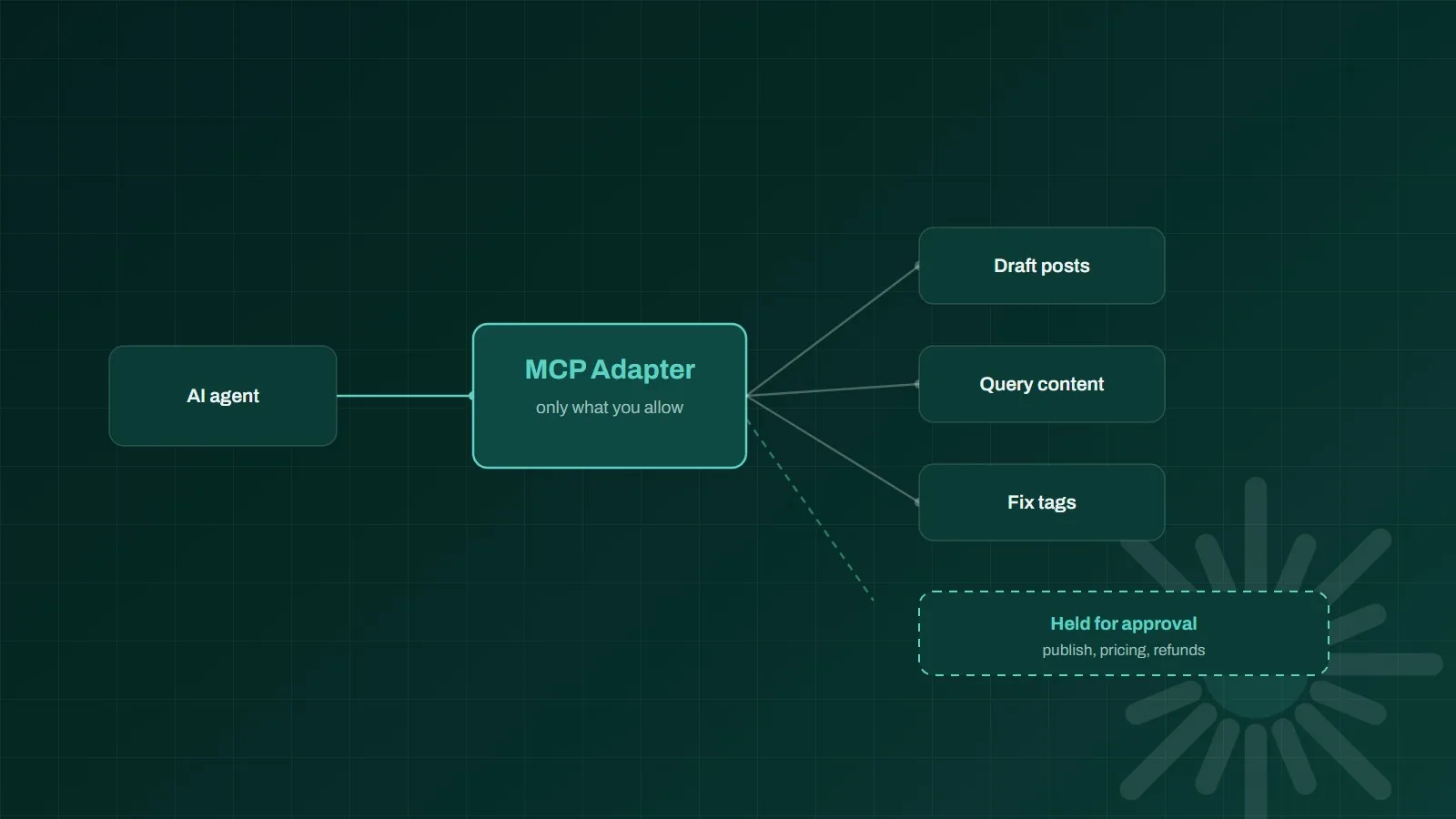
WordPress MCP is the official way to let an AI agent do real work on your site: the MCP Adapter turns registered site abilities into tools an assistant can discover and call over the Model Context Protocol. Announced on the WordPress developer blog in February 2026 and built on the Abilities API that arrived in 6.9, it means a request like "find every draft about pricing and tag them" can be executed by software instead of a person clicking through the admin. That is genuinely useful, and it is also the moment your website becomes something an autonomous system can change. This guide covers how it works, the permissions to set before you connect anything, what agents are reliably good at, and the mistakes that turn a helpful assistant into an incident.
TL;DR
The MCP Adapter exposes WordPress abilities as agent-callable tools, needs 6.9 or newer, and authenticates with Application Passwords. Abilities are invisible to agents until you explicitly mark them callable, so the safe setup is a dedicated least-privilege user with a short list of enabled tools and human approval on anything public or financial.
- What it is: a bridge that turns site abilities into tools an AI agent can find and use
- Default posture: abilities are hidden from agents until explicitly exposed, which is the right way round
- Where it works: small, well-defined jobs like drafting, querying, tagging and bulk tidying
- Where it bites: broad permissions, shared admin credentials, and no log of what the agent changed
By the numbers
11,334
new vulnerabilities were found across the WordPress ecosystem in 2025, up 42% year on year. Patchstack
91%
of those vulnerabilities came from plugins, with just two found in WordPress core itself. The Repository
6.9+
is the WordPress version the MCP Adapter needs, since it builds on the Abilities API. WordPress Developer Blog
Industry figures are cited for context; outcomes vary by business and implementation.
How WordPress MCP actually works
There are three layers, and it helps to keep them separate in your head. At the bottom, the Abilities API lets plugins and custom code register what the site can do as named, structured capabilities: create a draft, query posts by status, update a product. In the middle, the MCP Adapter publishes selected abilities as tools over the Model Context Protocol, the standard AI clients use to discover what a system offers. At the top, an agent connects, reads the list of available tools, and calls them to complete a task. Authentication happens with Application Passwords, which is why the guidance is to create a dedicated user for the agent rather than handing over an administrator login.
What agents are reliably good at here
The honest pattern from teams running this in production is that agents are strong on small, self-contained, verifiable jobs and weak on open-ended ones. Content operations work well: drafting and organizing posts, searching and querying by topic or status, tidying categories, tags and SEO metadata. Bulk data work is a natural fit, because the tedium is exactly what people get wrong. WooCommerce product and order tasks are common, and agencies use it for routine multi-site chores. What does not work reliably yet is asking an agent to build or redesign a site unsupervised. It will produce something plausible either way, and plausible is the problem.
- Good fit: draft and organize content, query posts by topic or status, fix taxonomies and metadata in bulk
- Good fit: repetitive commerce chores such as product data cleanups and routine order lookups
- Needs review: anything published to customers, priced, refunded or deleted in bulk
- Not yet: unsupervised full builds or design decisions, where plausible output hides real errors
The permissions setup to use before you connect anything
The default posture is already sensible: abilities are invisible to MCP clients until someone explicitly marks them callable. Keep that discipline rather than switching everything on to see what happens. Create a dedicated WordPress user for the agent with the narrowest role that still lets it do the job, and give that user its own Application Password so the credential can be revoked without disturbing anyone else. Enable a short list of abilities, not the full catalog. Keep publishing, pricing and refunds behind a human approval step. Then make sure you can answer one question at any moment: what did the agent change in the last week, and where is that written down?
This is the same discipline we describe in our guide to AI agent governance, applied to a website instead of a back-office system. The ladder is identical: let the agent suggest before it acts, let it act with approval before it acts alone, and promote it only when its track record on real work justifies it. If agents are already running elsewhere in your business, your site should join that register rather than becoming a quiet exception to it.
The risks worth taking seriously
Two things make this different from adding another plugin. First, the WordPress attack surface is already dominated by extensions: of the 11,334 vulnerabilities found across the ecosystem in 2025, plugins accounted for 91%, and only two were in core. Anything that grants programmatic access deserves the same skepticism you would apply to installing an unknown plugin, because a credential that can call tools is worth more to an attacker than one that can only read.
Second, agents read untrusted text. If your agent summarises comments, form submissions or scraped competitor pages, it is consuming content that a stranger wrote, and that content can contain instructions aimed at the agent rather than at you. That is prompt injection, and the defense is not a cleverer prompt: it is narrow permissions, so that even a successfully hijacked agent cannot do much. We go deeper on that failure mode in our guide to AI agent security. The short version for WordPress: assume the instructions can be poisoned, and make sure the account behind them is boring.
A sensible first project
Pick one job that is tedious, reversible and easy to check. Retagging a messy blog archive is a good candidate: it is repetitive, a human can spot a bad result instantly, and nothing customer-facing breaks if it goes wrong. Run it on staging, with a least-privilege user and only the abilities that job needs. Review what changed, then decide whether to repeat it on production. If that goes well, add a second job rather than broadening the first one's permissions. If you are still on an older version, this is a good reason to plan the upgrade: our companion piece on what changed in WordPress 7.0 covers the AI Client and the wider release. And if you would rather have the setup, the permission model and the monitoring handled for you, that is what our AI agent and WordPress development work is for.
Bottom line: WordPress MCP is a real capability, not a demo, and it is most valuable on the boring jobs nobody enjoys. Treat the agent as a user with a job description rather than a magic assistant, keep its permissions narrow and its actions logged, and it will save real hours without ever becoming the thing that took the site down.
Frequently asked questions
What is the WordPress MCP Adapter?
The WordPress MCP Adapter is an infrastructure layer that exposes registered site abilities as tools an AI agent can discover and call over the Model Context Protocol. It builds on the Abilities API and needs WordPress 6.9 or newer. In practice it turns actions such as drafting a post, searching content or updating product data into tools an assistant can use directly, instead of a person clicking through the admin.
Is it safe to connect an AI agent to my WordPress site?
It can be, if you treat the agent as a user rather than a feature. Abilities are hidden from MCP clients by default and must be explicitly marked callable, which is the correct posture. Connect a dedicated least-privilege account with its own Application Password, enable only the abilities the job needs, keep publishing and payment actions behind human approval, and make sure the actions are logged and the credential can be revoked in seconds.
What can AI agents actually do on a WordPress site?
They are most reliable on small, well-defined jobs: drafting and organizing content, searching and querying posts by topic or status, tidying taxonomies and metadata, bulk data operations, and routine WooCommerce product or order tasks. Full site builds and open-ended design work still need human review, because the model will produce something plausible whether or not it is right.
Do I need WordPress 7.0 to use MCP with AI agents?
The MCP Adapter builds on the Abilities API, which requires WordPress 6.9 or newer, and WordPress 7.0 brought the wider AI foundations including the provider-agnostic AI Client into core. If you are planning this work, moving to 7.0 on staging first is the cleaner path, because you get the shared AI client and the agent tooling on a supported baseline rather than mixing versions.