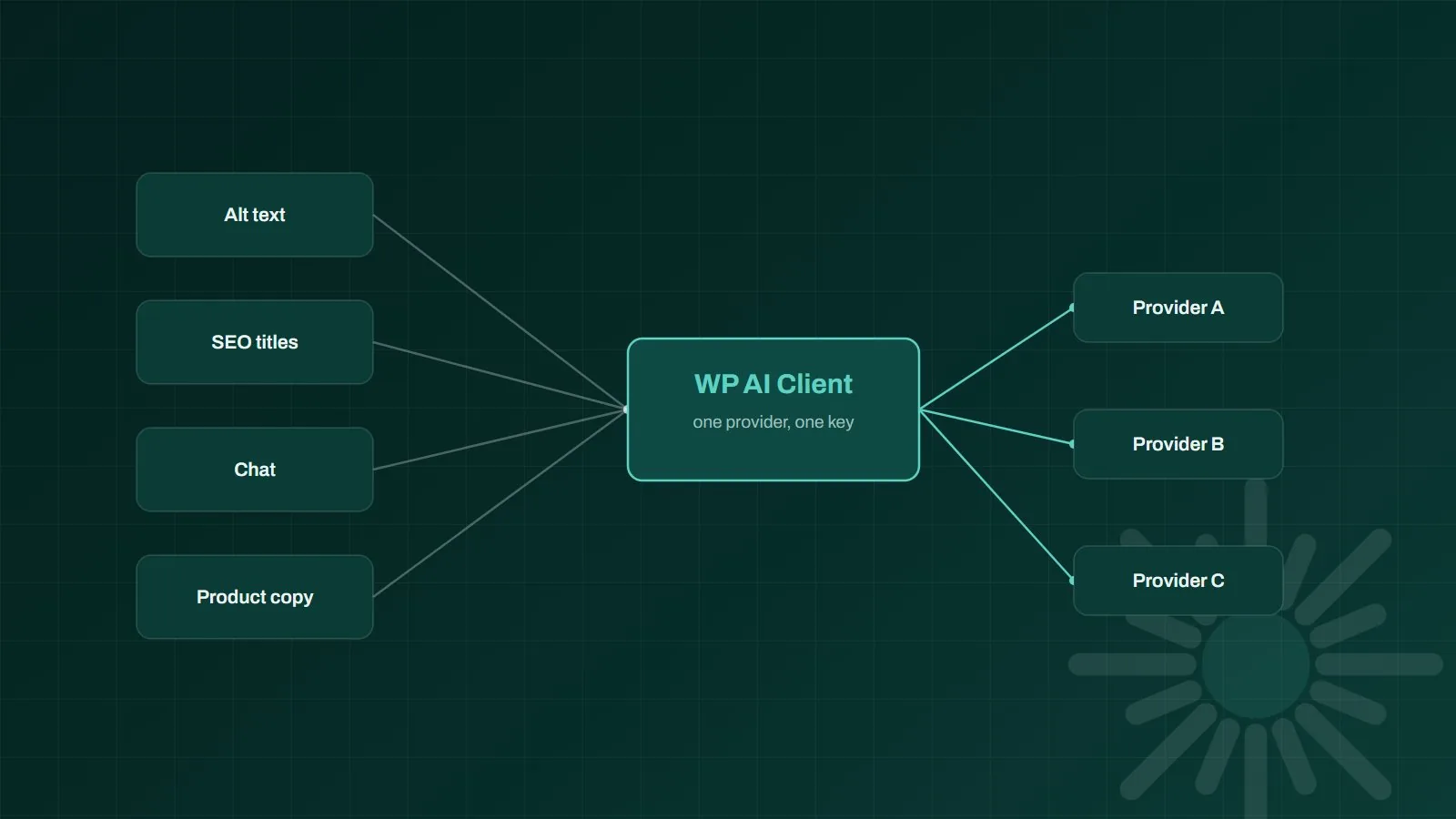
AI in WordPress core means the platform now ships its own standard way for plugins to talk to AI models, instead of every plugin bolting on its own. That is the real change in WordPress 7.0 "Armstrong", released on 20 May 2026: not a headline writing assistant, but plumbing. Core gained a provider-agnostic AI Client, an Abilities API that lets code describe what a site can do in a machine-readable way, and an MCP Adapter that exposes those abilities to AI agents. If you own a WordPress site, the practical question is not whether to be excited. It is what this changes about the plugins you run, the API keys you pay for, and who can now reach into your site. This guide covers what shipped, what it means, and what is worth doing this quarter.
TL;DR
WordPress 7.0 put AI infrastructure into core rather than AI features. Plugins can now call models through one shared, provider-agnostic client, and an Abilities API plus MCP Adapter let AI agents discover and use what your site can do. You still need a plugin to see a visible feature, but the plumbing underneath is finally standard.
- What shipped: AI Client, Abilities API and MCP Adapter, not a built-in content writer
- Why it matters: fewer duplicate API keys, easier provider switching, less plugin sprawl over time
- The new surface: agents can now reach your site through a standard protocol, so permissions matter more
- Do this quarter: test 7.0 on staging, audit your AI plugins, decide your provider before your plugins decide for you
By the numbers
41%
of all websites run on WordPress as of August 2026, according to W3Techs data. WPZOOM
875+
contributors shipped WordPress 7.0 "Armstrong" on 20 May 2026, the release that put AI foundations in core. WordPress.org
6
consecutive months of CMS market-share decline reported for WordPress ahead of the release. Search Engine Journal
Industry figures are cited for context; outcomes vary by business and implementation.
What actually shipped in WordPress 7.0
Three pieces matter, and none of them is a feature you can point a client at. The AI Client is a shared interface plugins use to send requests to generative models. It is provider-agnostic: a plugin asks for text or an image, and WordPress routes the request to whichever provider the site has configured. The Abilities API, which landed in 6.9, lets code register what a site can do in a structured, discoverable way, so "create a draft post" or "look up an order" becomes a named capability rather than a private function buried in a plugin. The MCP Adapter then turns those registered abilities into tools an AI agent can find and call over the Model Context Protocol. Read together, the pattern is clear: WordPress is not trying to win at writing copy. It is trying to become the layer other AI software plugs into.
Why a shared AI client beats another AI plugin
Anyone who has audited a busy WordPress install knows the pattern. One plugin writes product descriptions, another generates alt text, a third does chat, and a fourth does SEO titles. Each carries its own provider integration, its own API key, its own billing, and its own opinion about which model to use. Nothing is shared, nothing is consistent, and switching provider means touching four settings screens and hoping nothing breaks.
A shared client changes the economics quietly. Provider choice becomes a site-level decision instead of a plugin-level accident. Credentials live in one place, which is easier to rotate and easier to revoke. And when a cheaper or better model appears, switching is a configuration change rather than a migration project. That last point matters more than it sounds: model pricing has been falling steadily, and the sites that benefit are the ones that can actually move.
What the Abilities API and MCP Adapter open up
This is the half of the release with the longer tail. Once a site's capabilities are registered as abilities, an AI agent can discover them and act: draft a post, search content by status or topic, tidy taxonomies, update product data. That is a genuine shift in what a WordPress site is. It stops being only a thing people log into and becomes a thing software can operate on your behalf. Sensibly, abilities are not exposed to agents by default. They have to be explicitly marked as callable, which is the right posture: opt in, not opt out. We covered the practical setup, the permissions model and the failure cases in our companion guide to connecting AI agents to WordPress with MCP.
If you already run AI agents elsewhere in the business, this is the moment your website joins that estate. The same questions apply here as anywhere else agents touch real systems: what can it reach, what can it change without a human, and is any of it logged. Those are AI governance questions, and they arrive with the plumbing whether or not anyone planned for them.
What this does not change
Three honest limits, because the announcements have been louder than the reality. First, core ships plumbing, not polish: you still install something to get a visible feature, and the quality of that feature is still the plugin author's problem. Second, none of this makes AI output correct. A model wired into your admin will write confident nonsense about your business just as readily as one in a browser tab, unless it is grounded in your actual content and data. Third, it does not reduce your security surface; it enlarges it. A standard protocol for reaching into WordPress is useful to you and equally useful to anyone who gets hold of a credential.
- Still needed: a plugin or custom build to turn core plumbing into something your team actually uses
- Still true: ungrounded models invent details, so retrieval from your own content still matters
- Now bigger: the access surface, because agents can reach the site through a documented protocol
- Unchanged: plugins remain the main source of WordPress vulnerabilities, so a lean install still wins
What to do about it this quarter
Start with a staging update, not a production one. WordPress 7.0 also began a broad admin redesign, so the upgrade is worth testing against your critical plugins and any custom code before it touches live. While you are in there, audit the AI plugins you already run: list them, note which model provider and key each one uses, and mark the ones that overlap. That list is usually shorter and more expensive than people expect. Then make the provider decision deliberately at site level rather than letting four plugins each make it for you.
After that, decide whether you want agents touching this site at all yet. It is a reasonable answer to say not yet, and simply take the shared client and the reduced plugin sprawl. If you do want it, do it with a dedicated least-privilege user and a short list of enabled abilities rather than everything at once. This is also where the build-versus-buy question resurfaces: our guide on WordPress versus a custom build still applies, and 7.0 shifts it a little further in WordPress's favor for teams who want AI features without owning the integration layer. If you would rather hand the upgrade, the audit and the guardrails to someone else, that is what our WordPress development work covers.
Bottom line: WordPress 7.0 did not give you an AI writer, it gave your site a standard socket for AI to plug into. The sites that benefit will be the ones that treat it as an infrastructure decision, choosing a provider on purpose and granting agent access deliberately, rather than waiting for a plugin to make both choices for them.
Frequently asked questions
Does WordPress have AI built in now?
Yes, but not in the way most people expect. WordPress 7.0 added AI infrastructure to core rather than a finished writing assistant. Core now ships an AI Client that gives plugins one standard, provider-agnostic way to call AI models, plus an Abilities API and an MCP Adapter. You still install a plugin to get a visible feature, but that plugin no longer has to build its own model plumbing.
What is the WordPress AI Client?
The AI Client is a shared interface in WordPress core that plugins use to send requests to generative AI models. It is provider-agnostic, so the plugin asks for a capability such as text or image generation and WordPress handles routing the request to whichever provider the site has configured. That means swapping model providers becomes a site setting rather than a plugin migration.
Do I need to update to WordPress 7.0 for AI features?
You need WordPress 7.0 for the AI Client, and 6.9 or newer for the Abilities API that the MCP Adapter builds on. Updating is worth planning rather than rushing: test on staging first, because 7.0 also began a broad admin redesign, and confirm your critical plugins and custom code are compatible before you move production.
Does AI in core mean I can remove my AI plugins?
Not immediately. Core provides the plumbing, not the interface, so you still need something that turns that plumbing into a feature your team uses. What changes is the sprawl: over time you should need fewer overlapping AI plugins, each with its own API keys and billing, because they can share one configured provider and one set of credentials.